Malciq: Mastering the Art of Spooky Typography Without Common Pitfalls
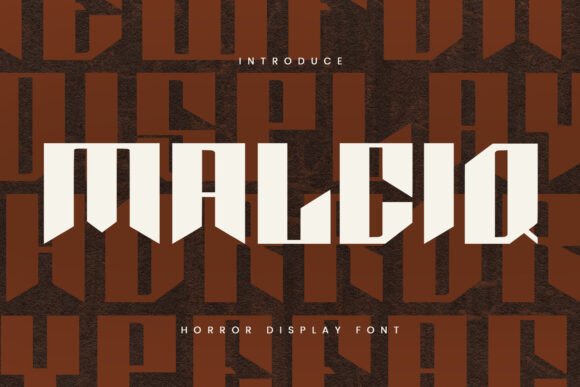
When you need a font that screams danger, mystery, or pure horror without relying on clichéd tropes, Malciq often rises to the top of the list. It is a display typeface defined by its bold, sharp lines and an edgy aesthetic that instantly communicates a creepy, dramatic mood. For designers working on movie posters, Halloween campaigns, or dark-themed branding, Malciq offers a visual hook that grabs attention immediately. However, the very features that make it effective—its aggressive angles and high contrast—can also lead to significant design failures if not handled with care.
Many creators assume that because a font looks scary, it automatically works for any horror project. This is a dangerous oversimplification. Using Malciq effectively requires understanding its structural limitations and knowing exactly where it fits within your broader design strategy. A poor application can turn a professional project into something that looks amateurish, difficult to read, or simply dated. Let's explore how to use this powerful tool correctly and avoid the common traps that undermine your creative vision.
Understanding the Limits of Display Fonts
The most frequent mistake I see with fonts like Malciq is treating them as a body text solution. Because the design is so striking, there is a temptation to use it for long paragraphs, captions, or detailed instructions. This approach almost always fails. Malciq is a display font, meaning it is engineered specifically for headlines, logos, and short phrases at large sizes.
When you shrink a display font down to readable text size, the intricate details get lost. The sharp serifs and decorative spikes that give Malciq its character begin to blur, creating a muddy mess on screen or in print. This reduces legibility significantly, forcing your audience to squint rather than engage with your message. If readability drops, communication breaks down, and the impact of your design is lost entirely.
To avoid this, restrict Malciq to titles, headers, and key focal points. Pair it with a clean, neutral sans-serif or serif font for your body copy. This combination allows the spooky element of Malciq to shine without sacrificing the clarity needed for the rest of your content. Think of Malciq as the special effects in a film; it needs to be the highlight, not the background noise.
Navigating Licensing and Sourcing Issues
Another critical area where projects stumble is the sourcing of the font itself. In the digital age, finding free versions of popular fonts is easy, but using unauthorized copies is a legal and ethical risk. Many beginners download Malciq from sketchy third-party repositories without verifying the license terms. This can lead to severe consequences later, especially for commercial projects.
If you are a small business owner, freelancer, or marketer, using a pirated version of a font can result in costly lawsuits or forced rebranding. You might spend weeks designing a campaign only to have to scrap everything because the typography wasn't licensed for commercial use. Furthermore, unofficial downloads often contain corrupted files or hidden malware, which compromises your computer's security.
The safer approach is to purchase or download Malciq directly from the creator's official website or a reputable foundry. Always check the End User License Agreement (EULA) before integrating the font into a client project. Does the license cover web usage? Can you embed it in a PDF? Is it allowed for merchandise? Clarifying these details upfront protects your reputation and ensures your work remains legally sound.
Common Visual Mistakes with Sharp Lines
Even when used correctly as a headline, Malciq's sharp lines can cause visual issues if the environment isn't right. The font relies heavily on negative space and thin counters to create its jagged effect. If you place this font against a busy background, such as a textured wall, a chaotic image, or a low-resolution photo, the letters will blend into the noise.
This lack of contrast makes the text hard to distinguish, defeating the purpose of grabbing attention. Instead of looking edgy, the text looks broken or unfinished. To fix this, ensure there is a solid buffer between the text and the background. Use drop shadows, outlines, or a semi-transparent overlay behind the text to separate it from complex imagery. This technique preserves the integrity of the sharp lines while maintaining visibility.
Additionally, be cautious with color choices. While black and red is a classic horror combination, it is not the only option, nor is it always the best. Overusing bright red on white can cause eye strain, making the text vibrate visually. Consider more sophisticated palettes, such as deep charcoal, muted purples, or metallic silvers, which can enhance the eerie atmosphere without overwhelming the viewer.
Context Matters: When Not to Use Malciq
Just because a font is spooky doesn't mean it belongs in every "dark" project. Context is king. Using Malciq for a serious medical report about a virus, a somber memorial service, or a corporate warning label sends the wrong message. The playful or theatrical nature of the font can trivialize serious subjects, leading to a disconnect between your brand voice and your audience's expectations.
For example, if you are launching a true-crime podcast, Malciq might fit perfectly for the logo. However, if you are writing an educational article about the history of forensic science, the same font would feel out of place and unprofessional. Evaluate the tone of your entire project. Ask yourself: does this font support the story I am telling, or is it just trying too hard to be scary?
If the answer leans toward the latter, consider stepping back. Sometimes, a cleaner, more subtle typeface conveys tension better than an overtly monstrous one. Restraint often creates more suspense than excess. Use Malciq when you want to celebrate the genre, not when you want to document a serious reality.
Practical Steps Before You Commit
Before finalizing your design or purchasing a license, take these practical steps to ensure Malciq is the right choice:
- Test Readability: Type out your headline and shrink it to 50% of its intended size. If you struggle to read it, do not use it for anything smaller than a main title.
- Check File Formats: Ensure the downloaded file includes the formats you need (OTF, TTF, WOFF2). Missing formats can delay your workflow significantly.
- Review the EULA: Confirm that the license covers your specific use case, whether it's print, web, or merchandise.
- Pair It First: Don't decide on Malciq in isolation. Test it alongside three different body fonts to see which pairing offers the best balance of style and function.
- Consider Accessibility: Remember that some users may have visual impairments. Ensure your contrast ratios meet accessibility standards even with decorative fonts.
By taking these precautions, you transform Malciq from a risky gamble into a reliable asset. It becomes a deliberate design choice rather than a default selection. When used with intention, respect for its limitations, and a clear understanding of its licensing, Malciq delivers that perfect blend of drama and edge that horror enthusiasts crave. It’s not just about picking a scary font; it’s about crafting an experience that resonates without compromising quality or professionalism.