Grinch 0.1: The Stylish Cartoon Font That Balances Whimsy and Quality
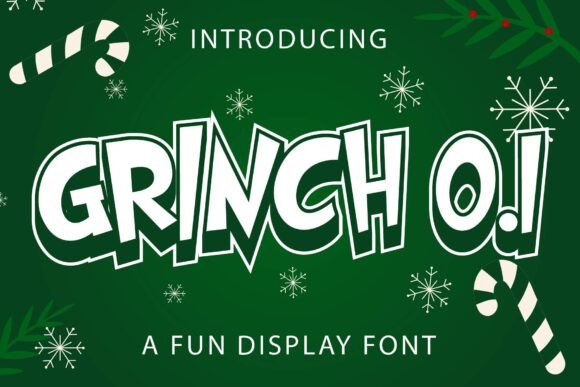
When you think of the Grinch, you immediately picture a character defined by sharp angles, jagged edges, and a distinctively mischievous charm. Grinch 0.1 captures that exact spirit, translating the iconic aesthetic into a digital typeface that is both modern and whimsical. This font is not merely a collection of letters; it is a design tool intended to bring a specific narrative quality to your work. Whether you are designing a holiday movie poster, creating a limited-edition T-shirt line, or crafting a playful headline for a blog post, this typeface offers a unique visual language. With 96 meticulously designed glyphs and 95 characters, it provides enough variety to handle most creative needs without overwhelming the user with unnecessary complexity.
However, finding a font that looks good in a preview does not guarantee it will perform well in your final project. Many creators make the mistake of selecting a display font like Grinch 0.1 based solely on its initial visual impact, only to discover later that it lacks the versatility required for their specific application. Understanding the nuances of this font before integrating it into your workflow can save you significant time, money, and frustration.
Understanding the Scope and Limitations of Grinch 0.1
The primary allure of Grinch 0.1 lies in its ability to evoke a sense of fun and nostalgia instantly. It is engineered to stand out, making it an excellent choice for title headings, movie names, and short bursts of text where personality is paramount. The 96 glyphs included in the set cover the standard alphabet, numbers, and essential punctuation, ensuring that basic sentences can be constructed with flair. Yet, this specificity comes with boundaries that every designer must respect.
A common misunderstanding among beginners is assuming that because a font has a "cartoon" style, it is suitable for body text or long paragraphs. This is rarely the case. Display fonts like Grinch 0.1 often feature exaggerated strokes, irregular baselines, and tight kerning that are visually striking at large sizes but become difficult to read when scaled down. Using this font for a full article or a block of instructions can lead to poor readability, causing your audience to disengage. The whimsical charm that works perfectly for a logo can quickly turn into visual noise when applied to a paragraph of fine print.
To avoid this pitfall, treat Grinch 0.1 as an accent rather than a foundation. Pair it with a clean, neutral sans-serif or serif font for your body copy. This combination allows the Grinch style to grab attention without sacrificing the legibility of the surrounding content. For instance, if you are designing a flyer for a holiday event, use the font for the event title and date, but switch to a standard typeface for the location details and schedule. This approach ensures your message is both eye-catching and accessible.
Common Mistakes in Downloading and Licensing
Before you even open your design software, there is a critical step that many users overlook: verifying the source and licensing of the file. The internet is filled with unofficial repositories where fonts are shared without proper authorization. Downloading Grinch 0.1 from an unverified site can introduce malware to your system or result in a version of the font that is missing crucial glyphs or contains rendering errors.
Furthermore, the legal implications of using a copyrighted character-based font can be severe. Just because a font is free to download does not mean it is free to use commercially. If you plan to sell T-shirts, merchandise, or marketing materials featuring this typeface, you must ensure you have the appropriate license. Ignoring these terms can lead to cease-and-desist orders, fines, or the forced removal of your products from marketplaces. Always check the documentation provided with the download. Look for clear statements regarding personal versus commercial use. If the license is ambiguous, contact the creator directly or choose a different font with transparent terms.
Another technical oversight involves file compatibility. Ensure that the version of Grinch 0.1 you download is compatible with your operating system and design software. Some older font files may not render correctly in the latest versions of Adobe Illustrator or Canva, leading to broken characters or spacing issues. A quick test run in your preferred software before committing to a major project can prevent last-minute disasters.
Evaluating Visual Consistency and Glyph Integrity
Once you have secured a legitimate copy of the font, the next area for scrutiny is the quality of the glyphs themselves. With 95 characters available, the range is sufficient for most headlines, but it is not exhaustive. You might encounter situations where you need a special symbol or a specific ligature that is not included in the set. Attempting to force the font to do what it was not designed for—such as stretching letters horizontally to fit a layout—can distort the carefully crafted shapes and ruin the aesthetic balance.
Pay close attention to the spacing between characters, known as kerning. In stylized fonts like this one, uneven spacing is sometimes part of the artistic intent, mimicking the hand-drawn nature of cartoon lettering. However, excessive gaps or collisions between letters can look unprofessional. When applying Grinch 0.1 to a T-shirt design, zoom in to inspect how the letters interact. If the "G" and "r" are touching awkwardly or the "x" looks too cramped, adjust the tracking manually. Do not rely solely on the default settings.
Color application is another factor that often gets overlooked. While the font itself is usually black and white in its vector form, the way you color it matters. Because the strokes are thick and bold, simple flat colors work best. Avoid complex gradients or textures within the letters unless you are highly experienced with vector masking, as these can obscure the intricate details of the glyphs. A solid, vibrant green or a contrasting red often honors the original inspiration while maintaining clarity.
Practical Steps Before Finalizing Your Design
- Test Readability: Print a sample of your design at the actual size it will appear. What looks clear on a screen may blur or become illegible on paper or fabric.
- Check License Terms: Confirm that your intended use (commercial, personal, web) is covered by the font's license agreement.
- Verify File Integrity: Open the font in multiple applications to ensure all 96 glyphs render correctly without glitches.
- Pair Wisely: Select a complementary font for body text to maintain a professional hierarchy in your layout.
- Respect the Style: Avoid distorting the font beyond its natural proportions to preserve the whimsical charm that defines Grinch 0.1.
By approaching Grinch 0.1 with a strategic mindset, you can leverage its unique qualities to enhance your creative projects effectively. It is a powerful tool for adding character and emotion to your work, but like any specialized instrument, it requires careful handling. When used correctly, this font transforms ordinary text into a memorable visual statement, capturing the essence of the Grinch while delivering a polished, professional result.